
Honda C70 Bike Mod for Bus Simulator Indonesia v4.5.2 2026 updated
Stay ahead of the game with this modern Honda C70 Bike Mod, guaranteed to work on Bus Simulator Indonesia v4.5.2 in 2026.
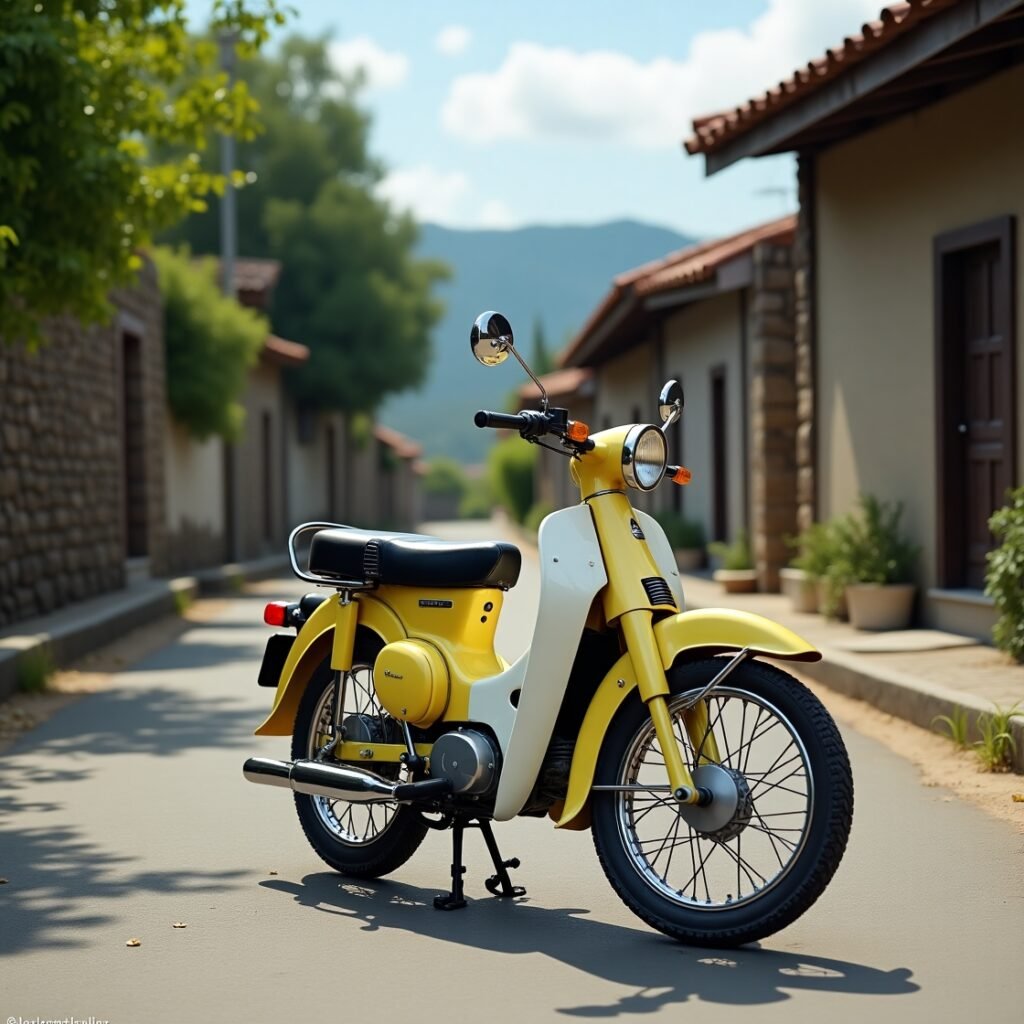
If you’re a fan of vintage motorcycles, the Honda C70 Bike Mod for Bus Simulator Indonesia (BUSSID) is a nostalgic gem you must try! Known for its iconic design, smooth ride, and legendary fuel efficiency, the C70 is a classic that has ruled the streets across Asia for decades. Now, BUSSID players can enjoy this two-wheeler in digital form — complete with its retro headlamp, stylish seat, and signature body style.
This mod is ideal for casual gameplay, city cruising, and adding variety to your BUSSID collection of vehicles. Whether you’re riding through rural lanes or busy roads, the Honda C70 brings a charming old-school vibe to the game.
Vehicle Name | Honda C70 |
|---|---|
Category | Bike Mod |
File Type | .bussidmod |
Livery Included | Yes |
Custom Sound | Yes (Vintage 4-stroke) |
Size | ~8 MB |
Supports | BUSSID v3.3.3 and above |
Interior View | Not available |
Game | |
Free or Paid | Free |
How to Download and Install Honda C70 Bike Mod for BUSSID
Follow the steps below to successfully download and install the Honda C70 Bike Mod on your Android device in Bus Simulator Indonesia (BUSSID).
Step 1: Download the Mod File
- Visit BUSSID mod apk bike skin.
- Search for Honda C70 Bike Mod.
- Download the file named something like
Honda_C70.bussidmod. - If there’s a livery file (image
.png), download that as well.
Tip: Use Chrome or another secure browser for downloading, and avoid unknown sources.
Step 2: Locate the Downloaded Files
- Open your File Manager or Downloads folder.
- Find the
.bussidmodfile you just downloaded. - If it’s in a .zip or .rar format, extract it using apps like RAR or ZArchiver.
Step 3: Move the File to BUSSID Mods Folder
- In your file manager, go to:
Internal Storage > BUSSID > Mods - If there’s no “Mods” folder, create one.
- Move the
.bussidmodfile (and the.pnglivery file, if applicable) into this folder.
Step 4: Open Bus Simulator Indonesia Game
- Launch the BUSSID app.
- Tap the Garage icon from the home screen.
- You’ll see the Honda C70 Bike Mod in your list if installed correctly.
Step 5: Use and Apply Livery (Optional)
- Tap on the Honda C70 mod and select “Use”.
- To apply the livery:
- Tap on Livery > Import from Gallery/Storage.
- Select the downloaded
.pngfile. - Adjust and tap Apply.
Step 6: Start the Ride
Hit Start and enjoy the smooth ride of the vintage Honda C70 bike in BUSSID!
Key Features of Honda C70 Mod
Retro Design
The mod perfectly replicates the vintage design of the Honda C70, including its rounded headlights, chrome-finished parts, and dual-tone paint scheme.
Realistic Sound
Comes with a unique engine sound that mimics the soft 4-stroke thump of the original C70.
Smooth Controls
Lightweight bike handling with optimized balance for easy riding in narrow city streets and sharp turns.
Working Lights and Horn
Headlamp, brake light, and classic horn are fully functional for immersive driving at night or in traffic maps.
Animated Rider
Includes a seated character that moves with the bike, enhancing realism during turns and acceleration.
Why You Should Download This Mod
This mod is perfect for players who enjoy something different in BUSSID — a peaceful two-wheeler ride instead of buses or trucks. The Honda C70 mod offers charm, cultural nostalgia, and smooth gameplay, making it a great addition to your mod collection.
Conclusion
The Honda C70 Bike Mod is more than just a vehicle — it’s a piece of retro history revived in BUSSID. With classic looks, smooth control, and a unique vibe, this mod is a great way to switch up your gameplay and enjoy the streets with style. Download it today and cruise like it’s the 1970s!
Also try:
- Muddy Off-Road Map Mod for BUSSID
- Hill Off-Road Map Mod For BUSSID
- Extreme Off-Road Map Mod for BUSSID
- Broken Hill Road Map Mod for BUSSID
- Realistic South Lane Tail Map Mod for BUSSID
- Village Map Mod For Bus Simulator Indonesia Download
You should also try these bus, bike, car, and truck skins to enjoy in BUSSID.
One Comment