
Maruti Suzuki Ertiga R3 Car Mod for BUSSID v4.5.2 2026– Download & Drive in Style!
We have tested this Maruti Suzuki Ertiga R3 Car Mod on low-end and high-end devices, and it runs smoothly on the current BUSSID v4.5.2 update in 2026.
Bus Simulator Indonesia (BUSSID) has become a popular game among simulation enthusiasts, allowing players to drive various vehicles on realistic Indonesian roads. One of the most exciting additions to BUSSID is the Maruti Suzuki Ertiga R3 Car Mod, a well-designed MPV that enhances your virtual driving experience. If you’re a fan of compact yet powerful vehicles, this mod is a must-have! In this article, we’ll explore its features, installation steps, and why it’s a great addition to your BUSSID collection.
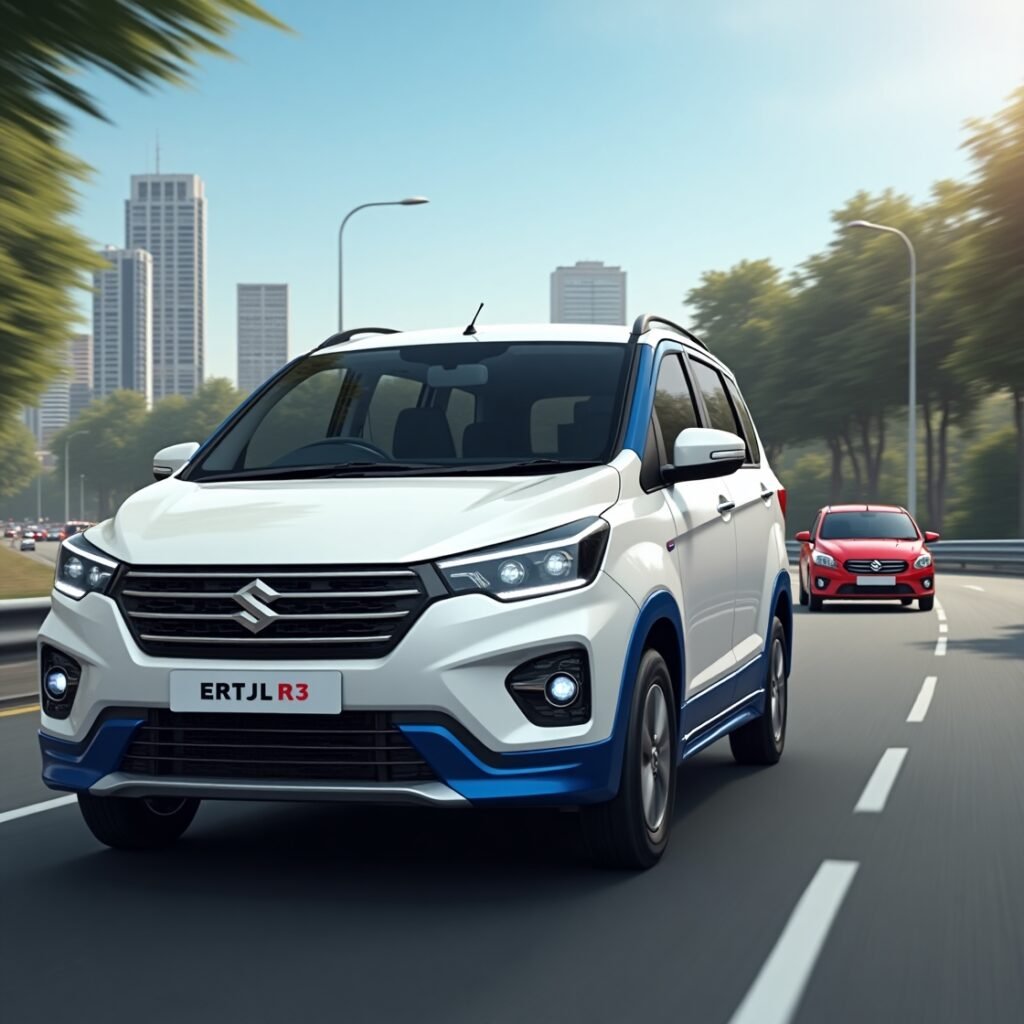
Mod Name | Maruti Suzuki Ertiga R3 Mod for BUSSID |
Vehicle Type | MPV (Multi-Purpose Vehicle) |
Author | Dasep Pratama |
Game | |
File Format | .zip |
Size | 15MB |
Customization | Livery support, color variations |
Performance | Smooth handling, realistic physics |
Interior Features | Detailed dashboard, custom seat textures |
Lighting System | Fully functional headlights and indicators |
How to Download and Install the Maruti Suzuki Ertiga R3 Car Mod in BUSSID
Installing the Maruti Suzuki Ertiga R3 Mod is simple. Follow these steps:
Step 1: Download the Mod File
- Search for the Maruti Suzuki Ertiga R3 Mod for BUSSID from the bus simulator Indonesia car skin.
- Download the .bussidmod file to your device.
Step 2: Move the Mod File
- Navigate to your File Manager and locate the downloaded file.
- Move the .bussidmod file to the BUSSID > Mods folder.
Step 3: Open BUSSID and Activate the Mod
- Open the Bus Simulator Indonesia (BUSSID) app.
- Go to the Garage section.
- Find the Maruti Suzuki Ertiga R3 Mod and select it.
- Click on Use to activate it in the game.
Now, you’re ready to drive the Ertiga R3 on BUSSID roads!
Features of Maruti Suzuki Ertiga R3 Car Mod
The Maruti Suzuki Ertiga R3 Car Mod for BUSSID offers a range of features that make it a perfect choice for BUSSID players:
High-Quality 3D Model
The mod comes with a realistic exterior and detailed interior to give an authentic driving experience. It accurately depicts the Ertiga R3’s sleek design and spacious interior.
Customizable Interiors:
This mod offers customizable interiors. Players can choose between different interior color schemes, such as black or cream, to suit their preferences.
Functional Lights:
All lighting elements, including headlights, taillights, and indicators, are fully operational, enhancing nighttime driving realism.
Realistic Engine Sound
This mod has the real engine sound of Ertiga R3. Experience the genuine engine sound of the vehicle while driving through the city or countryside.
Smooth Handling:
The mod ensures responsive and smooth handling, providing a comfortable driving experience across various terrains.
High-Speed Performance
Enjoy powerful acceleration and smooth braking for a thrilling ride.
Compatible with the BUSSID Livery System
It allows you to customize the vehicle’s skin for a unique look.
Optimized for Low-End Devices
Runs smoothly on most smartphones without lag or performance issues.
Why Choose the Maruti Suzuki Ertiga R3 Mod for BUSSID?
If you’re looking for a stylish, compact, and high-performance car mod for BUSSID, the Ertiga R3 is an excellent option. Here’s why:
Perfect for Family and City Drives
The Ertiga R3’s spacious design makes it feel like a real MPV for urban and highway travel.
Realistic Driving Experience
It offers realistic driving experience with its amazing mod features like smooth handling, realistic engine sounds, and responsive controls.
Customization Options
You can change the car’s livery, interior color, and more to personalize your ride.
Great for Multiplayer Mode
It has multiplayer mod option also. So Enjoy this session with friends using the Ertiga R3 and explore BUSSID’s diverse landscapes.
Tips for the Best Driving Experience
Adjust the Steering Sensitivity
If you find the handling too sensitive, tweak the controls in the settings.
Choose the Right Camera View
Switch between cockpit view, third-person, and top view for better visibility.
Follow the Traffic Rules
Drive carefully to avoid penalties and collisions in the game.
Customize Your Livery
Download and apply different liveries to give your Ertiga R3 a fresh new look.
Practice Before Entering Multiplayer
Get familiar with the vehicle’s handling in single-player mode before racing online.
Conclusion
The Maruti Suzuki Ertiga R3 Car Mod for BUSSID is an excellent addition to your BUSSID vehicle collection, offering a realistic, high-quality, and enjoyable driving experience. With its detailed 3D model, realistic features, and smooth performance, this mod makes your virtual rides more exciting and immersive. Follow the installation steps above and start driving the Ertiga R3 in BUSSID today!
Try also:
For more amazing skins, you can try these mods and enjoy your game.

One Comment